GenosDB vs Yjs and Automerge: Real-Time Collaboration Without a CRDT Library
How Yjs and Automerge solve collaborative editing, what each one costs you in infrastructure — and how GenosDB reaches the same live experience with a database that already ships identity, permissions and P2P transport.
The Problem Everyone Solves the Same Way
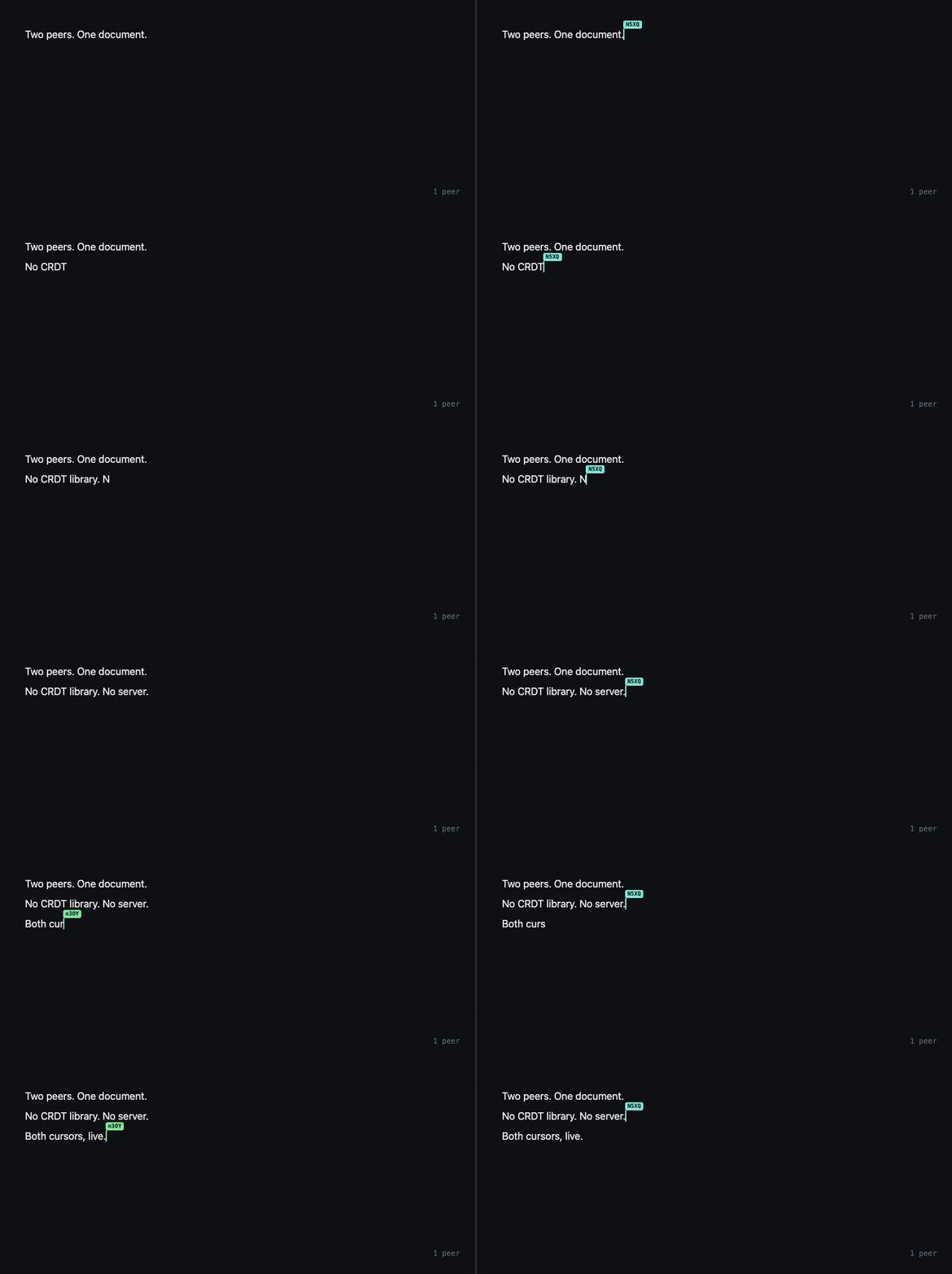
Two people open the same document. Both type. Nobody loses a word.
The standard answer to that requirement is a CRDT library — usually Yjs or Automerge. Both are excellent, and both solve the hardest part of the problem: merging concurrent edits without a coordinator. But a CRDT library is a merge engine, not an application backend. Once it is in place, the rest of the system is still missing — and most of what is missing is what your app actually spends its code on.
This article looks at what each library does, what it leaves for you to build, and how the same live experience can be reached with a database that already carries the missing pieces.
What Yjs Actually Does
Yjs is a shared-types library built on YATA, a sequence CRDT. Its data structures — Y.Text, Y.Array, Y.Map — merge concurrent operations deterministically, so every peer converges on the same document regardless of arrival order.
Its strengths are real and worth naming:
- Character-level merge. Two cursors inside the same sentence interleave correctly. This is the hard case, and Yjs handles it.
- State vectors. A peer describes what it has as
{clientID → clock}, and the other side computes an exact delta. Efficient when writers are few and stable. - Editor bindings. Adapters exist for ProseMirror, CodeMirror, Monaco, Quill and TipTap — separate packages, each on its own release cycle.
- Pure JavaScript, with tombstone garbage collection and
Y.mergeUpdatesfor compacting history without instantiating a document. A Rust port (yrs) exists for native peers.
What Yjs is not, by design, is a stack. It is a merge engine, and everything around it is a separate decision:
- Transport. The public demos run against a y-websocket server. There are WebRTC providers, but the well-trodden path — the one every tutorial takes — is a server relaying updates.
- Persistence.
y-indexeddbis a separate package, wired by you. - Identity, permissions, queries. Not in scope. A Yjs document has no concept of who wrote what, no roles, and nothing to query — it is a document, not a database.
One detail is worth pulling out, because it shapes everything below: awareness — the cursors, selections, names and colours you see moving on screen — is not CRDT data even in Yjs. It travels on a separate, ephemeral protocol and dies with the session. Yjs made that call deliberately: presence is not history, so it should not pay the price of history.
What Automerge Actually Does
Automerge takes a different route: an operation-based CRDT with full history. Every change is a node in a hash-addressed DAG — the same idea as a Git commit graph — so a document carries its own past, and time travel and per-character attribution come for free.
Its strengths:
- Character-level merge, like Yjs, plus rich text with marks.
- History as a first-class citizen. Every version is reachable and every change is attributable, without you designing a versioning scheme.
- Efficient sync protocol. Peers exchange heads plus Bloom filters; identical heads mean nothing is transferred.
- Cross-platform core in Rust, compiled to WASM for the browser.
And its costs, which are the flip side of the same design:
- A document never forgets. History is the data model, so opening a long-lived document means loading its past, and the cost grows with the document's lifetime rather than with its current size.
- WASM in the bundle. Fine for most apps, awkward for some environments and for cold-start budgets.
- Access control is a separate layer. Keyhive is the answer being built for it, and it is explicitly experimental.
- A sync server in the standard setup.
automerge-repoships one, and the documented path uses it.
The Dividing Line, Stated Plainly
There is exactly one thing these libraries do that a plain database does not: interleave two edits inside the same span of text, at the same instant, character by character. It is a narrower case than it sounds. Two people typing into the same paragraph at once keep both edits when they touch different places: the store keeps the winner, and the writer whose write lost the race re-applies its own edit over it as an ordinary signed write — no CRDT, no merged value that nobody signed (how it works). Only the same span at the same instant is the later writer's, with both carets in view — and an application that needs even that can add it itself, keystroke by keystroke on the ephemeral channel, where it needs it rather than everywhere. The Keystrokes example does exactly that: one paragraph everyone types into at once, inside the same word if you like, with the channel and the graph shown side by side as they happen.
That capability is genuinely hard to build, and it is the reason both projects exist. It is also, in the collaborative applications most teams actually ship, the rarest case in the room — and the one that human beings avoid on their own the moment they can see where everyone else is standing. That is the observation Notion, Linear and every block editor since have been built on: make presence visible and collisions mostly stop happening.
Everything else people reach for a CRDT to get — concurrent edits across a document, ordering that survives simultaneous inserts, offline writes that reconcile on reconnect, live cursors — does not require a sequence CRDT at all. It requires the right granularity and a presence channel.
The Other Path: One Node per Paragraph
GenosDB is a peer-to-peer graph database, not an editor library. But because a document can be modelled as data, collaborative editing falls out of the database's own primitives. The live example is a continuous document — write, press Enter, keep writing — implemented in one HTML file with no editor framework and no CRDT dependency. The technique has four parts:
- A paragraph is a node. Editing a paragraph rewrites only that node, so two people working on different paragraphs never overwrite each other — there is no shared node to fight over. Last-write-wins is a problem only when two writers share a node, and at paragraph granularity they usually do not — and when they do, both edits survive unless they touch the same span.
- Fractional order keys. A paragraph inserted between order
1and2gets a key in the gap. Two peers inserting into the same gap concurrently mint different keys, so both survive, and every peer sorts them identically — an engine guarantee, see Ordering, Precisely below. No counters to coordinate, no rebalancing to synchronise. - Structure is graph operations. Enter splits a paragraph into two nodes; Backspace at the start merges a paragraph into the previous one and deletes it; pasting multi-line text creates one node per line. Concurrent structural edits land on different nodes, so they compose instead of conflicting.
- Awareness on an ephemeral channel. Named, coloured carets and live selections travel over a GenosRTC data channel and never touch the graph — the same architectural decision Yjs made, reached from the same reasoning. And the paragraph being typed is broadcast keystroke by keystroke, so remote windows move character by character, while the debounced database write remains the truth that persists and repairs.
The result behaves like the CRDT demos: type in one window, watch it appear letter by letter in the other, with a named cursor showing where your collaborator is.
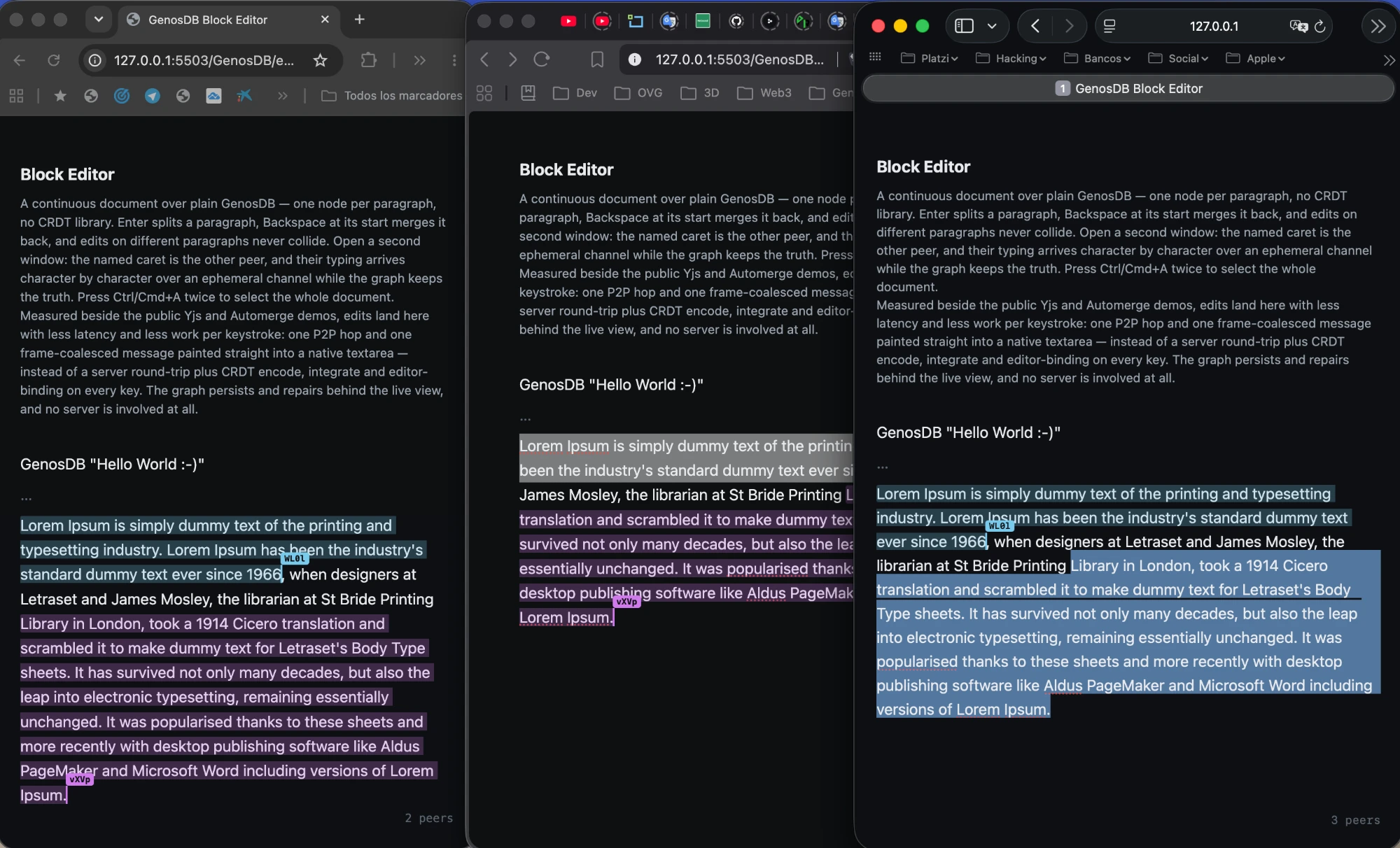
Every window is a separate peer. The coloured cursors and selections travel on the ephemeral channel; the text itself lives in the graph.
Ordering, Precisely
The second bullet above makes a promise that deserves a mechanism: every peer sorts them identically. Here is exactly what holds it up, and where it stops.
A key is a double. A paragraph inserted between order 1 and 2 gets a key at a random point in the gap — random so that two peers inserting into the same gap at the same instant mint different keys, and both survive. A float64 carries 53 bits of mantissa, and each insert into the same gap keeps about half of what is left: after roughly fifty successive inserts between the same two paragraphs, the next key rounds onto its neighbour and the two tie. Typing a document top to bottom never gets there, because every new paragraph opens a fresh gap of one. A multi-line paste is the one action that would, so it mints its keys in a single batch: the gap is divided once, into one slot per line, and each line lands inside its own slot. Two hundred pasted lines spend about eight bits of the mantissa instead of exhausting all fifty-three.
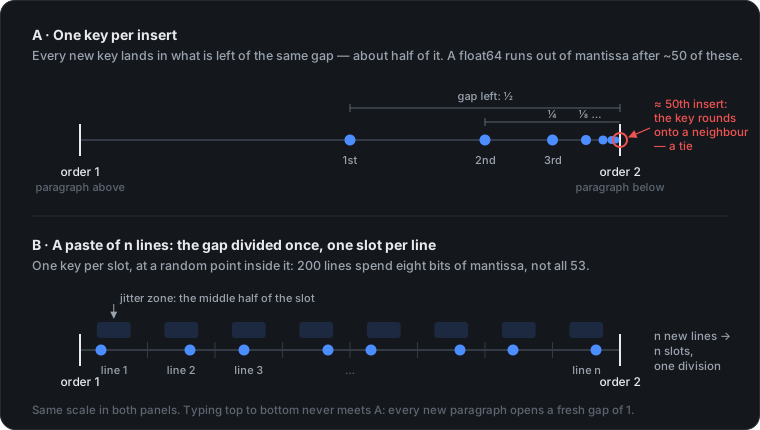
Same gap, same scale. Inserting one key at a time halves what is left until a key lands on the neighbour; a paste divides the gap once and never gets close.
The example draws this live. Beside the document, every paragraph's key sits on a number line, to scale: the four warm dots are a paste that just landed, spread once across one gap, and the panel says how many halvings the gap under the caret has left.
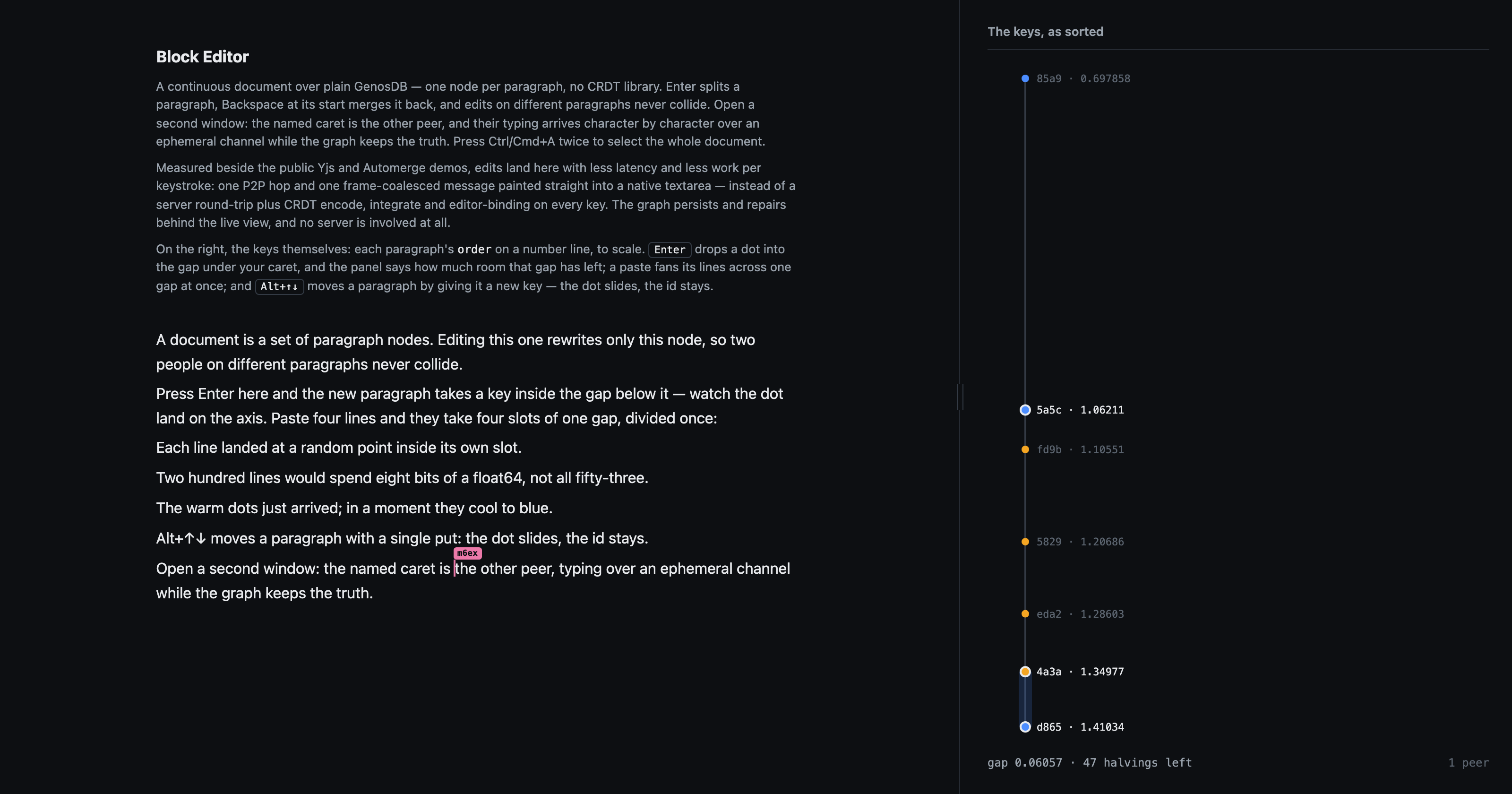
One peer's window. The other peer's named caret sits in the last paragraph; on the right, the keys the paragraphs are sorted by, the paste's four dots still warm and the gap under the caret with 47 halvings left.
The engine settles ties. A sorted db.map breaks a tie on the node id, in the direction of the sort. Two replicas holding the same nodes read results, the initial events and every \(limit/\)after page in the same order, whatever order their nodes arrived in, and desc is the exact reverse of asc. Before, a tie fell to arrival order, which differs on every peer, and the examples had to compensate by hand. The rule costs one comparison per tie and thirty-nine bytes gzipped.
Where the key lives is the whole difference. Bartosz Sypytkowski, who maintains Yrs — Yjs in Rust — arrived at the same trade from inside the CRDT world. Scaling fractional indexes to a million spreadsheet rows, he sets interleaving aside as a cost the granularity absorbs, and spends his design on packing each key into eight bytes and on a move semantics of tombstones and pointers. He needs that machinery because in his model the key is the row's identity: to move a row you delete it and insert another, and two concurrent moves leave two rows unless a move CRDT reconciles them. In GenosDB the node id is the identity and order is a field it carries. Moving a paragraph is one put; two peers moving the same paragraph at once resolve, by last-write-wins on the hybrid logical clock, to one paragraph in one place — no tombstone, no pointer, no second key space.
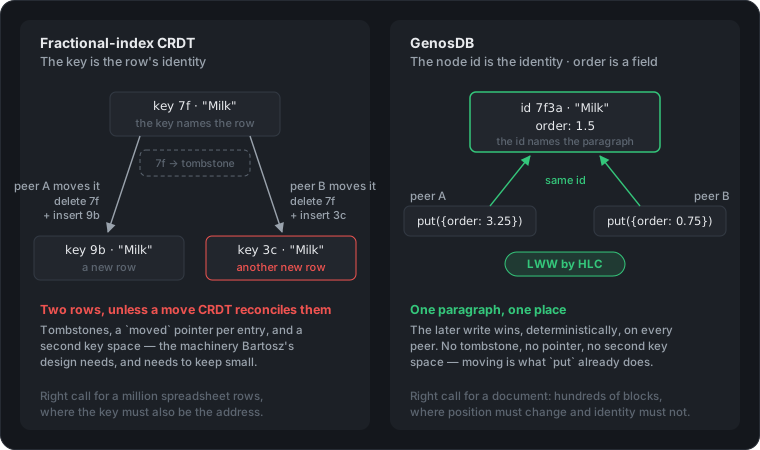
In a fractional-index CRDT the key names the row, so a move is a delete plus an insert. In GenosDB the id names the paragraph and position is a value it carries, so a move is the write it already knows how to do.
The same technique, taken to code, is the subject of the next article: A GitHub With No Server applies one-node-per-line editing to a code editor and adds what GitHub runs servers for — owned commits, branch protection and pull requests — from the same graph.
That is also the honest boundary. There are no string keys, no rebalancing and no move CRDT here, by design: a document is hundreds of blocks, not a million rows, and the float, the batch and the tie rule cover that range with nothing to maintain. Should a table with a million rows ever be the target, his post is the map. The pattern, its limit and the engine's rule are written up in the Ordered Lists guide.
The same keys now run a second example, a spreadsheet: rows and columns are identities, position is a key, and a cell is a node named after its row and its column — so a row moves with its cells in one put, and a column inserted in the middle shifts the letters, not the data. It also answers the figure that opens his post: Alice and Bob typing into A3 of an empty sheet while apart, and ending with six rows and two cells. Here the base grid is never written. A row nobody inserted has the same id and the same key on every peer, so both write the same cell and end with one value — his virtual key, at no cost.
Why the Path Is Shorter
Both approaches produce live text on a remote screen. The difference is what a single keystroke has to do to get there.
In the standard CRDT setup, a keystroke is encoded into one or more CRDT operations, sent to a sync server, relayed to each peer, integrated into the receiving replica's structure, and rendered back through an editor binding. Every step is fast; there are simply several of them, and one of them is a round trip through infrastructure you have to run.
In the block-editor example, a keystroke is one hop over a direct WebRTC data channel — coalesced to at most one message per animation frame — and the receiver assigns a string to a native textarea. No encoding step, no integration step, no binding, no server. The graph write that persists it happens behind the live view, debounced, and repairs anything the network dropped.
That is an architectural difference, not a benchmark: fewer stages and no relay hop. It is also why the demo is a single file you can save and open, with nothing to deploy.
What Comes in the Same Package
This is where the comparison stops being about merge algorithms. A CRDT library gives you a document. GenosDB gives you a database that happens to be able to hold one — so the surrounding application does not need a second stack:
- Queries.
db.map({ query, field, order, \(limit })— filters, ordering, pagination, full-text matching and recursive graph traversal with\)edge. A document is a query result, not a special case. - Identity. Cryptographic, sovereign identities with mnemonic recovery and WebAuthn passkeys built in. Every operation can be signed by its author.
- Permissions. Role-based access control and node-level ACLs, enforced independently by every peer against the verified signer — a zero-trust model, not a client-side courtesy.
- Encryption. Field-level and record-level, with cryptographic read revocation.
- Persistence. OPFS-backed, offline by default. No adapter to choose.
- Transport. WebRTC peer-to-peer with automatic peer discovery and a Cellular Mesh overlay that keeps connection counts flat as rooms grow, instead of the O(n²) full mesh. No sync server anywhere in the picture.
None of that is bolted on for the editor: it is the same engine every other GenosDB application uses. The editor is roughly two hundred lines on top of it.
Offline Is Not a Feature You Add
The claim worth testing in a peer-to-peer system is not what happens while everyone is connected — it is what happens when they are not.
Run the example across multiple devices, disconnect the network entirely, write a different paragraph on each one, and reconnect. Every document converges, no matter how many peers wrote offline or in which order — because the graph is stored locally, the operation log carries what each peer missed, and a state digest lets converged peers exchange nothing at all. The live cursors come back on their own.
That behaviour is not editor code. It is the database doing what it does for every application built on it.
What the Choice Actually Is
The choice is not between three merge algorithms. It is between a library that owns your document and a database that holds it:
- A sequence CRDT — Yjs, Automerge — owns the document. It interleaves keystrokes inside the same words, and in Automerge's case keeps the whole history. It does so blindly: after hours apart, two versions of a paragraph are woven into a text nobody wrote, with no conflict to show anyone. It comes as a library with its own data model, metadata that grows with every character ever typed, and a sync server or a second transport beside it.
- GenosDB holds the document as data. Two people on the same paragraph keep both edits when they touch different places; the same span at the same instant is the later writer's, in view, never woven; and an application that needs keystroke-level interleaving adds it where it needs it, on the ephemeral channel, instead of paying for it everywhere. Queries, identity, permissions, encryption, offline persistence and peer-to-peer transport come with the same nodes, and every value is one writer's, signed.
They are not mutually exclusive, either. Because GenosDB stores arbitrary values, binary CRDT updates can travel as ordinary nodes in the graph — the transport, persistence, identity and access control come from the database, and the merge engine stays whatever you chose. The point is not that CRDTs are unnecessary. It is that most collaborative applications reach for one to get things a database should already give them.
Try It
The example is a single HTML file, with no build step and nothing to deploy:
- 👉 Open the Block Editor — then open it again in a second window and type in both.
- 📄 Read the source — the technique is documented in comments, in place.
- ⌨️ Open Keystrokes — the narrow case, added where an app wants it: one paragraph everyone types into at once; on the right, the channel keystroke by keystroke, the graph snapshot by snapshot, and a hash proving every window shows the same text.
- 🧮 Open the Spreadsheet — the same keys in two dimensions; type into
A3in both windows and watch one cell, not two rows. - 🌿 Open dCode — the block editor's technique on a code editor: one node per line, named carets, the page running beside the code as you type, and underneath it a code host with branches, forks and pull requests, every commit signed, owned and runnable. No server. The sequel to this article, A GitHub With No Server, explains how.
- 🧭 See how GenosDB compares across other P2P and distributed databases, or read the full GunDB guide if that is where you are coming from.
⭐ Found this useful? Star GenosDB on GitHub — or spin it up in seconds: npm i genosdb.
This article is part of the official documentation of GenosDB (GDB). GenosDB is a distributed, modular, peer-to-peer graph database built with a Zero-Trust Security Model, created by Esteban Fuster Pozzi (estebanrfp).
📄 Whitepaper | overview of GenosDB design and architecture
🛠 Roadmap | planned features and future updates
💡 Examples | code snippets and usage demos
📖 Documentation | full reference guide
🔍 API Reference | detailed API methods
💬 GitHub Discussions | community questions and feedback
🗂 Repository | Minified production-ready files
📦 Install via npm | quick setup instructions
About the author
Full Stack Developer - dWEB R&D
Comments
Join the discussionNo comments yet. Be the first to comment.